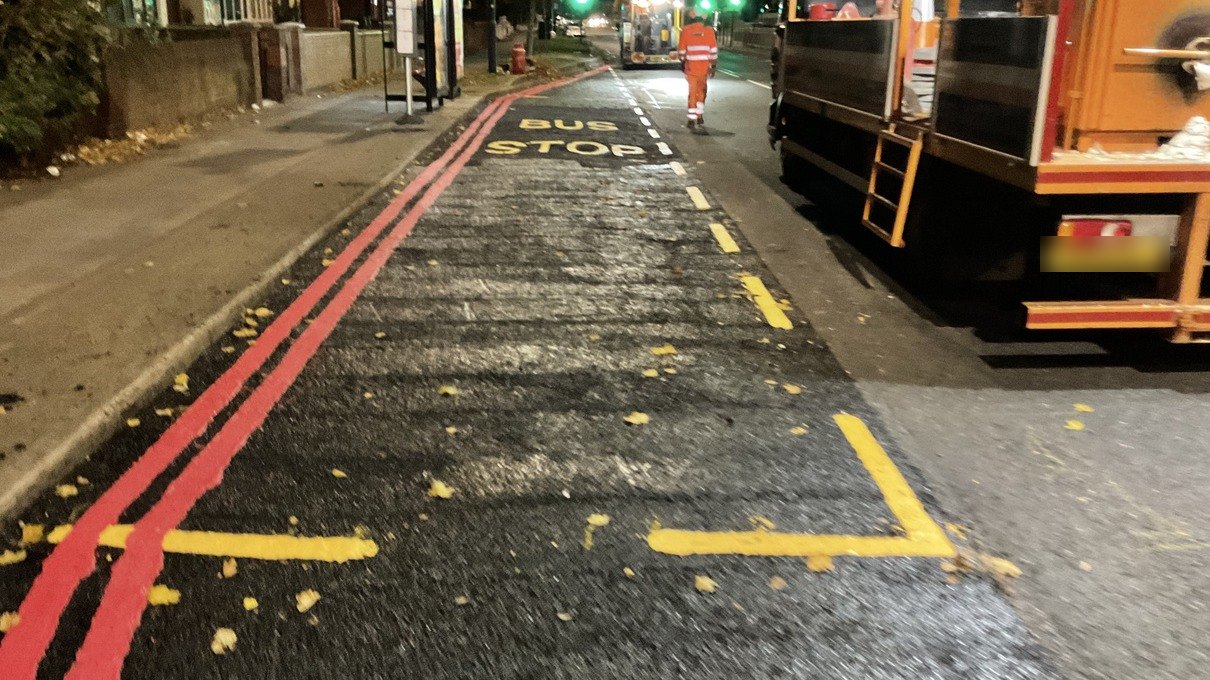
Built on our own live night works

Paperwork done before the crew leaves site.

P3S is one app for highway, surfacing and reinstatement crews, and one screen for the office. Job sheets, RAMS sign-on, vehicle checks, timesheets, material loads and client-ready site reports.

Nothing to install. Works on any phone, tablet or office computer, with or without signal.
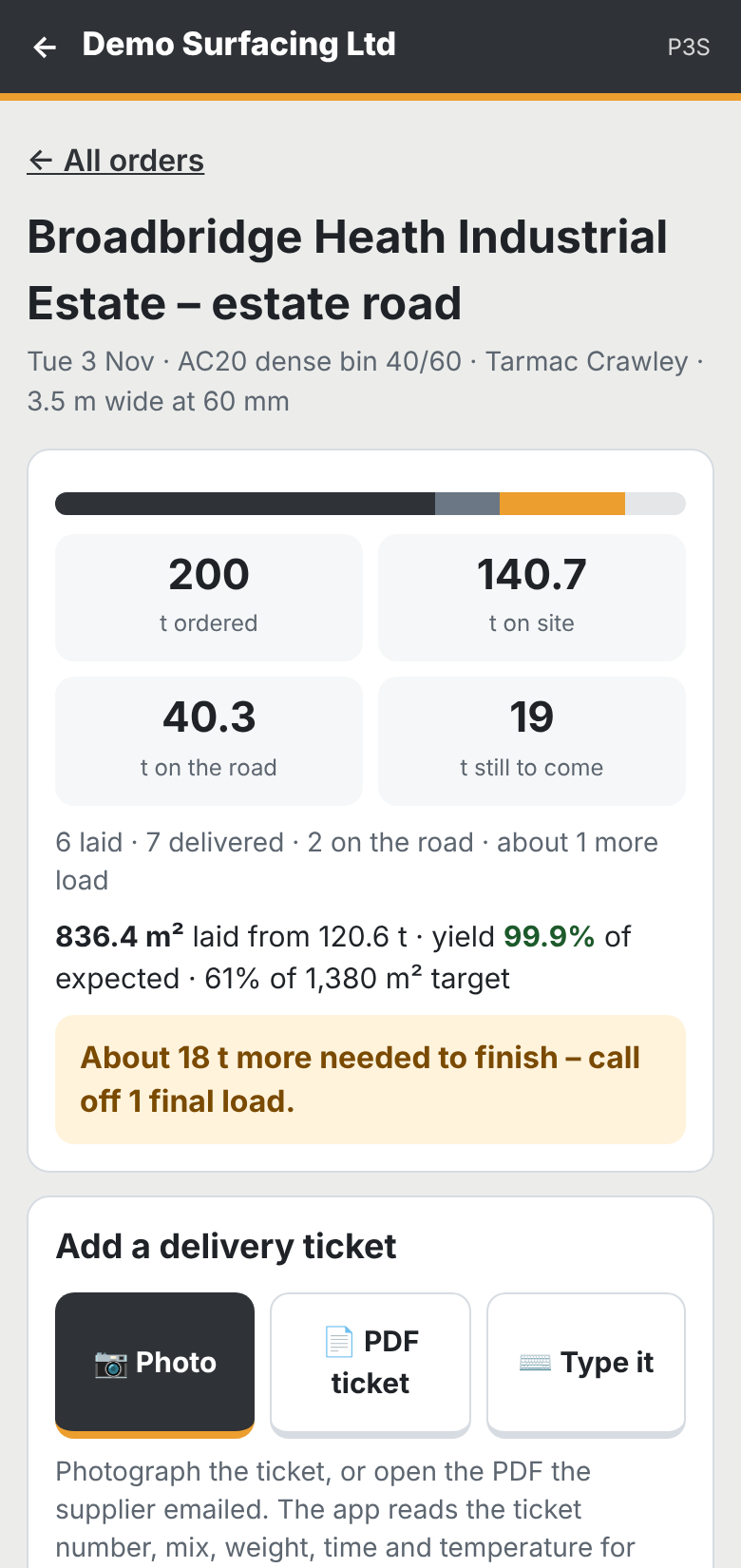
Asphalt surfacing screen: 200 tonnes ordered, 140.7 on site, 40.3 on the road, 19 still to come
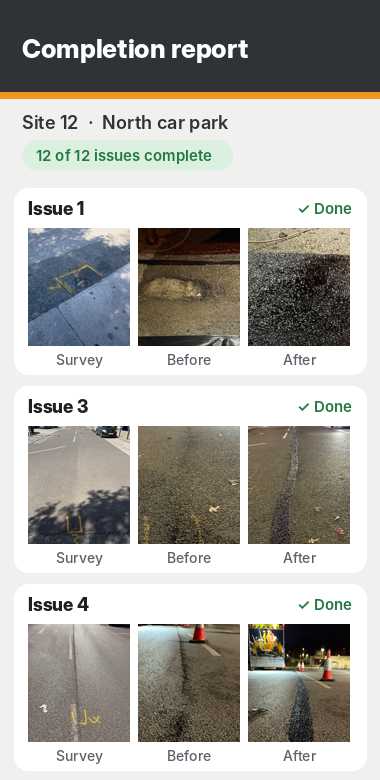
Completion report screen with survey, before and after photos for each issue
Vehicle check passedVan 3 · 05:52
RAMS signed: 6 of 6Briefing complete · 19:24
Report sent to client12 issues, photos attached · 07:02
151 storesNational car park programme run on P3S
Every nightUsed by our own crews on live works
No signal?Keeps working, sends when it reconnects
Your logoOn the app and every report

Plan it once. Everyone knows.

Put the job in, pick the crew and vehicles, and P3S does the chasing.

  • Plan the week in minutesSites, dates, start times, crew, vehicles and traffic management, all from your own staff and fleet lists. Nothing typed twice.
  • Weather warnings before the shiftToday's and tomorrow's shifts are checked against the forecast near the site. If rain, strong wind or cold is due, the crew gets a phone alert and the office gets an email.
  • No double bookingsPut someone or a vehicle on two jobs at once and P3S warns you before you save.
  • Vehicles scheduled to every shiftEach van and machine is booked to the shift, so you know where it is and who's driving.
  • Job sheets sent to the crewEveryone gets their job sheet before the shift: where, when, who with, map link and the RAMS.
Planner · Wed 11 Nov3 shifts
Site 12, North car parkNight · 19:30
JBMKTRDSVan 3Tipper 1Rain 70% from 02:00
High Street resurfacingNight · 20:00
PWCLPaverLow loaderDry
MK is already on Site 12 tonight. Change the crew before saving.
Depot yard dayDay · 07:30
AFVan 5Wind 45 mph gusts

Example planner: sites, initials and weather are for illustration. Weather warnings arrive on the phone and by email.

No more missed signatures.

Briefings, RAMS and toolbox talks are signed live on site, on each person's own phone, and time-stamped.

  • Site-specific RAMS for every shiftBuilt from the job and your approved method statements, in the crew's job folder before they arrive.
  • Briefings signed live on siteThe supervisor briefs, everyone signs on the phone. You can see who's signed in real time.
  • Weekly toolbox talksPublish once and it goes to everyone, with a list of who still hasn't signed.
  • Near misses and incidentsReported from site in seconds, with photos, straight to the office.
Shift briefing · Site 1219:24
JBSupervisor Signed 19:18
MKOperative Signed 19:19
TROperative Signed 19:21
DSDriverNot signed yet
Toolbox talk "Working near live traffic": 18 of 19 signed this week.

Example sign-off: initials and times are for illustration.

New: site surveys

Survey the site. The issue report writes itself.

No separate survey app. Walk the site, drop a pin on the map for each defect, take the photo and add the size. One tap makes the issue report, and the same issues are already on the crew's phones.

  • Pin every defect on a satellite mapTap where it is, or drop it at your own location. Drag to fine-tune.
  • Photo, type, size and priorityPothole, crack, joint, ironwork and more, with length and width and your notes.
  • Branded issue report in one tapCover, site map with numbered pins, and every issue with its photo, ready to send.
  • Straight into the completion reportThe crew adds before and after photos to the same issues. Nothing re-typed, nothing uploaded.
1234
Issue 3 · Pothole0.6 m x 0.4 m · trolley bay, right-hand side
HIGH

Example survey: pins and details for illustration.

Every repair. Proven.

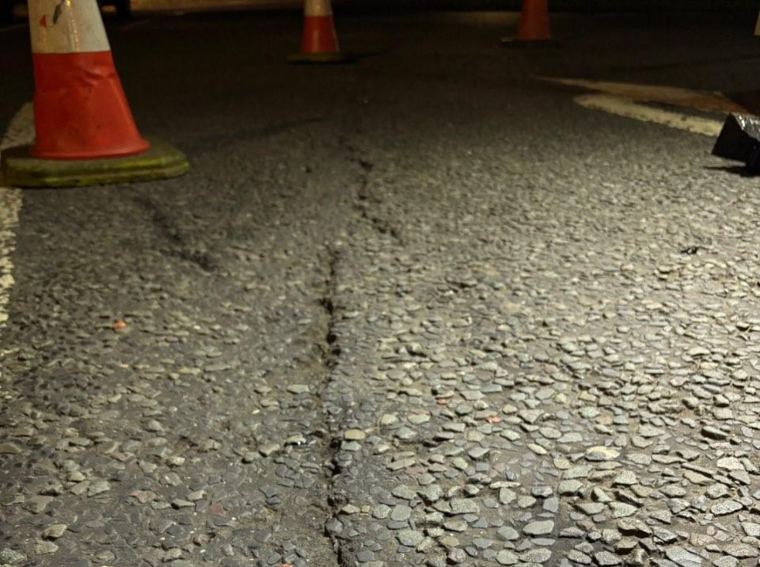
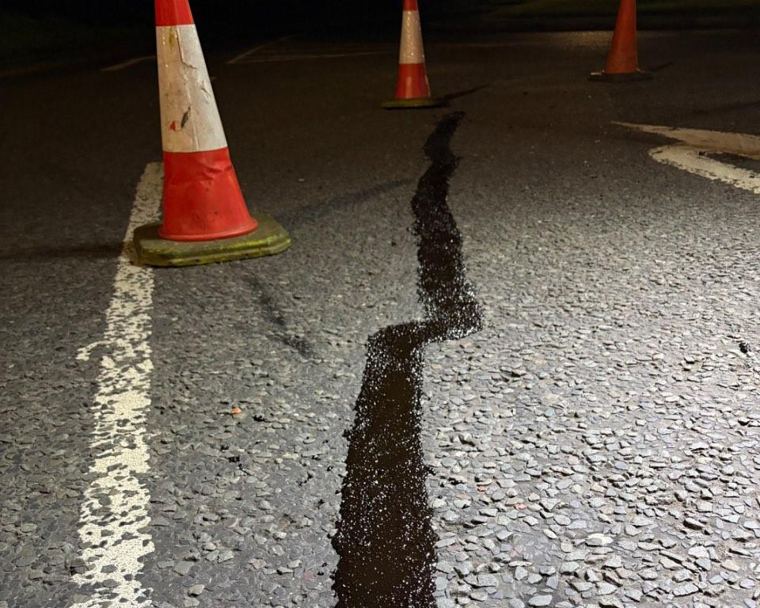
A real joint seal from one of our night shifts. Drag the line to see the night before and the finished repair, photographed from the same spot and matched to the client's own survey.

Before: open crack in the car park surface at night After: the crack sealed, same spot BEFOREAFTER
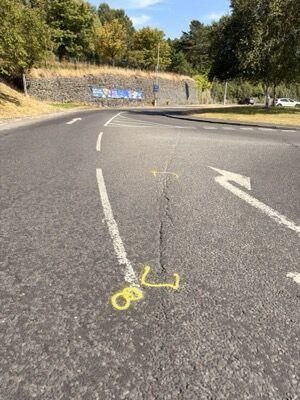
The client's survey photo of the same crack
The client's survey

Issue imported with the client's own photo and number, so the report lines up with their list.

How a job runs

From the client's issue list to a finished report, without anyone retyping anything.

  1. Load the issue list

    Import the client's list from Excel, CSV, a pasted list or a PDF survey with its photos.

  2. Crews work through it

    Each issue is on the phone with the client's photo. The crew takes a before and an after, and notes any extra work.

  3. The report is ready

    Tap Complete and the branded report is built. The office gets an alert, and the client can have it the same night.

The report your client actually wants

Every issue on the client's own numbering: their survey photo, your before and your after, with the size and status.

  • Your logo, your colours, your client's name
  • Site set-up and site-left-safe photos on every job
  • Every photo stamped with time and location
  • Extra works and site comments kept for your office, not the client
Completion report on a phone: issues 1, 3 and 4 each with survey, before and after photos

Everything your crews run on.

Everything a highway contractor runs on, in one app. Switch on what you need and add the rest when you're ready.

Site surveysPin defects on a map and create the issue report.
Weather alertsRain, wind and cold warnings by phone and email.
No double bookingsCrew and vehicles flagged if they're on two jobs.
Job sheetsSent to every crew member before the shift.
RAMS from the jobSite-specific, built from your approved masters.
Live briefing sign-offSigned on site, on each person's phone.
Toolbox talksWeekly talks with a list of who's still to sign.
Near missesReported from site with photos.
Vehicle checksDaily walk-round checks on the phone.
Instant defect emailsThe fitter and office told straight away, with photos.
No check, no goAlert when a vehicle goes out unchecked.
Repair cost historyEvery repair and part logged per vehicle.
Plant and low loader movesBook pavers, planers and rollers in and out.
TimesheetsFilled in on the phone, ready for payroll.
Fuel log and stockReceipts photographed, restock emails sent.
Estimates and quotesPriced from your rates, accepted online.
Office viewA to-do list for managers: enquiries, approvals, defects.
Planings and WTNsEvery tipper load to tip, with the signed note.
Dip sheetsDips in, averages and tonnes worked out.
Saved tipsOpening hours, what they take, directions.

Asphalt surfacing

How many tonnes are on the road right now?

Photograph the delivery ticket or paste the supplier's email. See what's delivered, on the road and still to come, and get the area laid and the yield for every load.

120.6 tlaid so far
40.3 ton the road
99.9%of expected yield
1 loadleft to call off

Figures from the demo job shown on the phone.

Asphalt surfacing screen in P3S
Freshly resurfaced and lined bus stop on a Platinum 3Sixty night shift, with the crew and lorry

Made by a highway contractor, for contractors

P3S was built by Platinum 3Sixty, a UK highway maintenance contractor, to run its own crews. It's used every night on multi-site repair programmes, so it's shaped by what crews and clients actually need.

Each company's data is kept separate and private, and we set it up for you, with your vans, team and RAMS loaded in.

Ask us anything, or start a free trial.

Tell us a bit about your crews and we'll come back to you, usually the same day. In the UK or Australia, we'll set up a trial with your logo and your own vans and team.

Rather email? enquiries@p3s.app

Try it on your next job.

We'll set up your account with your logo and send your team their sign-in links. Free trial, no card needed. Pricing on request.

Start a free trial